What's new in VeliraPay: November 2026
Everything that changed in November, from the embedded checkout and new networks to chat alerts, tax exports, sanctions screening and new libraries.
5 min read Product updates
Here is everything that changed in VeliraPay in November 2026. The biggest changes each have an article of their own, and the rest are below.
The headline changes
- Take payments without leaving your site. Open the checkout over your own page or inside it with one script, and let your page react as the payment is detected, paid or closed.
- USDT on Tron, and three more networks. Customers can now pay USDT on Tron, USDT and USDC on Polygon and Arbitrum One, USDC on Base, POL, and ETH on Arbitrum One.
- New prices from 14 November. The free plan now keeps 1.75% of each payment, and Pro 0.25% for $9.99 a month. Here is what changed, and which charges keep the old terms.
- Know more about who is paying. A charge now names the network behind the customer's IP address, and warns when that address is in another country than the one they gave.
- New roles: Finance, Support and Viewer. Three roles join Owner and Admin, so each person in your organization gets the access they need, and an owner can require two-factor of everyone.
- Webhook delivery logs and the Events page. Each webhook delivery keeps every attempt for 30 days, with the request we sent and the answer your server gave, and resends in one click.
Invoices that work as a checkout
A charge needs its coin up front. When the buyer should choose it, an invoice per order now does the job of a one-off checkout:
- an
expires_atstops new payments at a set time, and an invoice left unpaid is voided once nothing is under way, with theinvoice.voidedwebhook; - a
success_messagethanks the customer on the payment page and in their receipt; - once it is paid, its page offers a button back to its
success_url, and while it is open, a link back to itscancel_url; - it names its customer by name, email or both, so the buyer's username on your site is enough.
Create the invoice when the order is placed, send the buyer to its page, and fulfil the order on the invoice.paid
webhook. The invoices reference lists every field.
Choose the coins your checkout offers
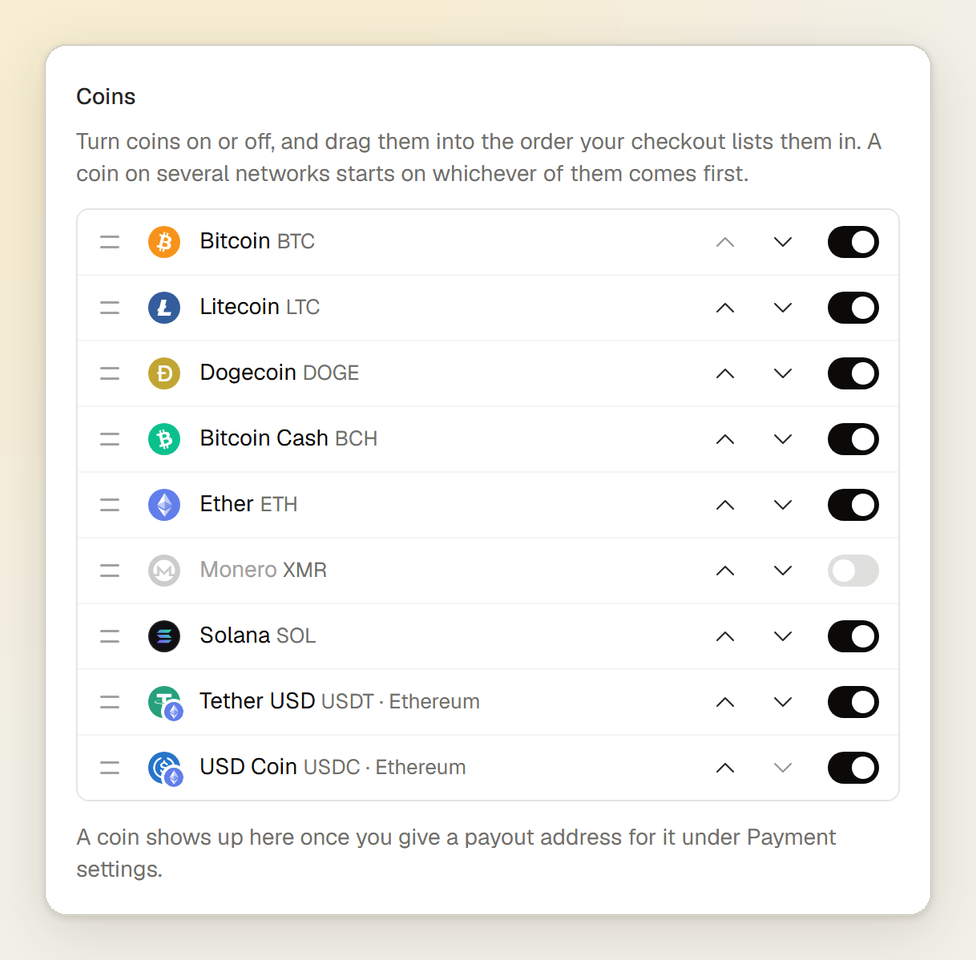
Under Settings → Organizations → Checkout, turn off any coin you would rather not take, drag the rest into your order, and pick the coin that is already selected when the checkout opens. A coin that is off is offered nowhere: not at your checkout, and not through the API or the MCP server either. A coin on several networks, such as USDT, starts on whichever of its networks comes first in your list.
Customers can also cancel a payment from the checkout now, as long as nothing has arrived for it. They go back to your cancel address if there is one, and you receive the charge.canceled
webhook, so the order can be released straight away.
Alerts in Discord, Slack, Telegram and your browser
Owners and admins can have payments, underpaid and late payments, payouts sent and failing webhook endpoints posted to one Discord channel, one Slack channel and one Telegram chat, under Settings → Organizations → Alerts. A message gives the amount, the charge's code and a link to it in your dashboard, and never your customer's email, name or IP address.
Each person can also turn on browser notifications under Settings → Notifications, in a Push column beside Bell and Email. On an iPhone or iPad, add the dashboard to your Home Screen first, since Safari only shows notifications for a web app.
Payout pages and tax exports
Every payout has a page of its own: what was kept, what you were owed and the transaction that carried it to you, with what it was worth in money at the charge's locked exchange rate.
Tax & accounting on the payouts page exports a year at a time, either as one line per payment for your accountant or bookkeeping software, or in Koinly's own format, where each payout pairs with the deposit in your wallet by its transaction hash.
Sanctions screening
Every live payment is checked against the crypto addresses on the US Treasury's sanctions list, which we download daily. A match never refuses the payment, since the money has already moved: it holds the payout, emails your owners and admins, and asks one of them to decide on the charge's page, either accepting the payment or asking for it to be returned. Nothing is ever sent back automatically.
Sanctions rules usually require money from a listed party to be frozen and reported rather than accepted or returned, so take legal advice before you act on a real match.
API keys with permissions and IP limits
An API key can now be restricted to the permissions it needs and tied to up to 20 IPv4 or IPv6 addresses or ranges, such as your servers'. Owners and admins can change a key's name, permissions and addresses later without replacing it.
With the matching permission, which full access never includes, a key or an AI assistant can also manage webhook endpoints, API keys, members, the account's settings and, once an owner allows it, payout addresses. Keys made before keep full access from anywhere. The authentication guide lists every permission.
Libraries for Node.js, Python and .NET
Official libraries for Node.js, Python and .NET join the ones for PHP and Laravel and the WooCommerce plugin. Every request in the documentation now has a tab for cURL, PHP, Laravel, Node.js, Python and C#, the documentation has a search, and the whole API is described in an OpenAPI file. The libraries page has each one's requirements and a first example.
Sign in with Google or GitHub
Continue with Google and Continue with GitHub are on the sign-in and sign-up pages, and still ask for your two-factor code if you use one. Connect or disconnect either under Settings → Security.
A passkey is recommended, not required
Changing payout addresses, API keys, webhooks or members no longer needs a passkey or an authenticator app. Those pages still ask you to confirm it is you every six hours: with your passkey or authenticator app if you have one, otherwise with your password or the Google or GitHub account you signed up with. We still recommend a passkey, and an owner can require one of everyone in their organization.
The dashboard in Portuguese and Russian
The dashboard now reads in Portuguese and Russian too, beside English, French, German, Spanish and Turkish. Pick yours under Settings → Language. The checkout and your customers' emails follow the customer's language, Arabic included.
A status page
status.velirapay.com shows whether the site, the API and the MCP server are up.